How Do You Create Dynamic Content for an Outdoor Kinetic Screen? From After Effects and DMX512 to TouchDesigner and UE5
One-Sentence Definition: Dynamic content creation for an outdoor kinetic screen is essentially an engineering workflow that converts the black, white, and grayscale information of visual content into real-time Z-axis motion commands for physical LED modules through a dedicated software ecosystem. With support for Adobe After Effects, Mshow, DMX512, TouchDesigner, and Unreal Engine 5, the SPKO-250 transforms outdoor advertising from something audiences simply watch into a physical display experience that actually moves.
1. You Installed an Outdoor Kinetic Screen—So Why Doesn’t the Content Move Properly?
Some clients invest heavily in installing an advanced outdoor kinetic screen such as the SPKO-250 on a building façade, only to discover that the final result feels underwhelming.
A conventional video is playing on the LED surface, while the mechanical modules behind it either remain completely still or move in ways that seem random and disconnected from the image.
The problem may not be the hardware. The missing piece is the content ecosystem.
For a conventional outdoor LED display, the content may simply be an MP4 file that is uploaded and played.
An outdoor kinetic screen is different.
Its core value comes from physical 3D movement.
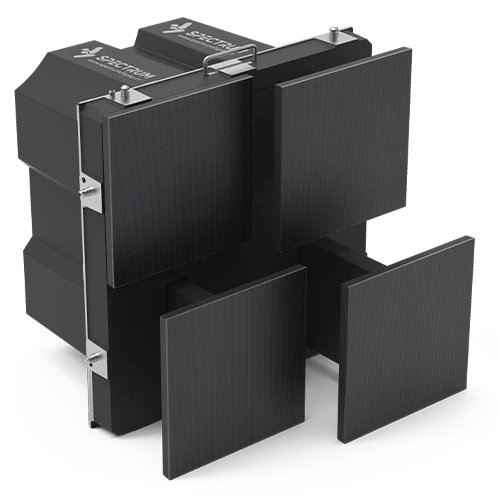
Hundreds or thousands of independent 248mm motion units need to move precisely within a 200mm Z-axis stroke, synchronized with the timing, shapes, lighting, and rhythm of the visual content.
If the content designer does not understand the mechanical logic behind the display, the video and physical movement can become completely disconnected.
To address this challenge, Shenzhen Spectrum Technology Co., Ltd. (Spectrum Display) has developed a content-creation ecosystem for the SPKO-250 that covers workflows from basic daily operation to advanced real-time interactive experiences.

2. The Core Concept: Kinetic Screen Content Is More Than Video—It Is Physical Motion Data
In a kinetic screen system, content can be understood as two synchronized layers:
- Visual Layer: The colors, images, graphics, lighting, and video content visible to the audience.
- Motion Control Layer: A grayscale map that determines how far each physical module extends or retracts along the Z-axis.
Grayscale becomes the language of physical movement.
- Pure Black (0%): The corresponding motion unit remains fully retracted.
- Pure White (100%): The corresponding motion unit extends to its maximum position—up to 200mm on the SPKO-250.
- Gray (1%–99%): The motion unit moves to an intermediate position somewhere within the available stroke.
This means the image is not merely being displayed.
Part of the content is being translated into physical displacement data.
Once this principle is understood, designers can use several different tools to create content for an outdoor kinetic screen installation.
3. Workflow 1: MotionMatrix4 + After Effects — Turning Visuals into Physical Depth
For professional designers, MotionMatrix4 + Adobe After Effects (AE) provides one of the primary workflows for creating kinetic content.
Designers can continue working inside the familiar After Effects environment while adding an additional dimension to the content:
physical Z-axis depth.
How Does It Work?
The designer creates visual content together with a black-and-white or grayscale motion map inside After Effects.
Through Spectrum Display’s MotionMatrix4 plugin, grayscale values can then be translated into displacement instructions for the kinetic modules.
Instead of simply telling a pixel what color to display, the content now also determines:
how far that section of the physical screen should move forward or backward.
Advantages for Outdoor Content Design
Real-Time Motion Preview: Designers can preview how changes in grayscale correspond to changes in the physical kinetic surface, making it easier to coordinate image and movement during content creation.
Motion-Speed Optimization: If an animation requires physical movement beyond the operating speed of the SPKO-250—such as an extremely fast Z-axis transition—the workflow can identify motion-speed constraints and help designers optimize the motion curve around the system’s 500mm/s maximum speed.
This is important because digital animation has virtually no physical inertia, while real motors and mechanical structures do.
High-Contrast Physical Effects: Combined with the SPKO-250’s ≥5,000-nit outdoor brightness, designers can create strong visual transitions in which bright graphics and physical displacement work together—for example, blocks appearing to physically burst outward from a building façade.
4. Workflow 2: Mshow — A Simplified Control Platform for Daily Outdoor Operation
Not every outdoor advertising operator has a professional After Effects designer available every day.
Commercial screens may need to change promotional messages, logos, campaign graphics, or event information frequently.
This is where Mshow provides a more accessible workflow.
Instead of building every kinetic sequence from scratch in professional motion-design software, operators can work with a visual content interface designed for more straightforward daily operation.
Users can arrange text, images, and other content elements on a digital canvas, configure transitions, and coordinate visual playback with physical movement.
For example, a brand name can be designed so that individual letters appear to physically project outward from the display before retracting back into the façade.
For shopping districts, retail promotions, pop-up campaigns, festivals, and other frequently updated outdoor applications, this significantly reduces the barrier to producing kinetic content on a regular basis.
5. Workflow 3: DMX512 Integration — Bringing Kinetic Motion into Urban Lighting Shows
An outdoor kinetic screen does not always operate as a standalone advertising display.
In many projects, it becomes part of a larger architectural lighting or multimedia show.
The SPKO-250 can integrate with professional show-control workflows using protocols such as DMX512, together with Ethernet-based lighting-control environments such as Art-Net and sACN.
This allows the kinetic display to work alongside lighting consoles and other show-control systems.
Application Scenario
Imagine a New Year’s Eve countdown or a large-scale urban light show.
Thousands of kinetic modules can move in synchronization with architectural floodlights, searchlights, media façades, audio systems, and other show elements.
Instead of treating the kinetic screen façade as an isolated screen, the show designer can integrate physical movement into the broader lighting timeline.
The building façade is no longer simply displaying video.
It becomes another programmable physical element within the show.
For lighting designers, this means kinetic movement can be incorporated into the same overall control logic used for other stage and architectural lighting systems.
6. Workflow 4: TouchDesigner + UE5 — Creating Interactive Outdoor Landmarks
When the SPKO-250 is installed in a pedestrian street, commercial plaza, public space, or interactive landmark, the system can go one step further.
It can respond to people.
By integrating TouchDesigner (TD) or Unreal Engine 5 (UE5) with external sensing systems, designers can create real-time interactive kinetic experiences.
For example:
- A LiDAR sensor or depth camera detects a pedestrian approaching the installation.
- The corresponding area of the kinetic surface reacts to the person’s position.
- Modules may retract inward like the surface of water responding to pressure, or gradually close as the viewer approaches.
- Real-time graphics generated in UE5 can be coordinated with physical Z-axis movement, allowing virtual events on screen to trigger corresponding physical motion across the façade.
Imagine a meteor striking a digital surface.
The impact is rendered in real time.
At the same moment, hundreds of physical modules react across the kinetic façade.
The audience is no longer simply watching an animation.
The digital event produces a physical response in real space.
This is where an Outdoor Kinetic Screen begins to move beyond advertising and into the territory of interactive architecture and public media art.
7. Special Rules for Outdoor Content: Long Viewing Distances and Strong Ambient Light
Because the SPKO-250 combines a P3.9 pixel pitch with 248mm motion units, and viewers are often positioned many meters away, outdoor kinetic content needs to follow a different set of design principles from conventional indoor motion graphics.
1. Use Large Visual Masses and Bold Shapes
Fine text and small graphic details can lose impact at long viewing distances, particularly when physical shadows are introduced by the moving modules.
Large logos, bold typography, strong geometric shapes, and clearly defined visual masses are generally more effective for outdoor kinetic content.
2. Use Strong Contrast and Clear Motion Hierarchy
Outdoor content must compete with strong ambient light.
High-contrast combinations and clearly separated grayscale levels help make the physical displacement of the modules easier to perceive.
The goal is not simply to make the image brighter.
It is to create enough visual separation between different depth levels so that viewers can immediately understand the physical geometry of the moving surface.
3. Build Safety Logic into Interactive Content
Interactive kinetic content also needs to account for physical safety.
If an external sensor detects that a person or object has entered a restricted interaction zone, the TouchDesigner or UE5 control system should be able to trigger the appropriate safety logic or global motion-stop command.
This works together with the SPKO-250’s 3kg anti-pinch protection threshold and project-level safety controls to reduce the risk of physical contact during interactive operation.
For kinetic installations, safety cannot be added after the content is finished.
It needs to be part of the interaction design from the beginning.
▶Video · YouTubeTouch It. Watch It React. — the screen responds to the visitor in real timeWatch on YouTube →
8. Frequently Asked Questions (FAQ)
Q1: Our designers only know how to create standard motion graphics in After Effects. Can they still create content for a kinetic screen?
A: Yes.
The MotionMatrix4 workflow is designed to extend the familiar After Effects environment into kinetic content creation.
The key new concept designers need to understand is grayscale-to-displacement mapping.
Instead of thinking only about X and Y coordinates, color, scale, and opacity, they also need to think about Z-axis depth.
Once that logic is understood, conventional motion-design skills can be adapted to physical kinetic content.
Q2: Outdoor advertising content changes every day. Do we need to rebuild everything in After Effects every time?
A: Not necessarily.
For routine updates such as changing text, logos, promotional graphics, or simpler kinetic sequences, Mshow can provide a more efficient operational workflow.
After Effects is better suited to highly customized brand films, major campaigns, product launches, and complex kinetic sequences.
A practical content workflow can therefore use:
Mshow for daily operation + After Effects for major creative campaigns.
Q3: Do interactive projects in TouchDesigner or UE5 need to be programmed from scratch?
A: Not necessarily.
A dedicated integration workflow can handle much of the underlying communication between the real-time engine and the kinetic control system.
Designers can then focus more on nodes, blueprints, sensor logic, real-time graphics, and interaction design rather than rebuilding the entire low-level communication architecture for every project.
For complex installations, however, project-specific development and system integration may still be required.
Q4: Should kinetic content be adjusted during heavy rain or strong winds?
A: Yes, particularly under extreme weather conditions.
Although the SPKO-250 is designed for outdoor operation with IP65 protection and an outdoor-oriented structural system, severe weather may require a more conservative operating strategy.
Depending on project conditions and local safety procedures, the system can reduce or suspend large-scale kinetic movement, retract the motion units, or switch to a static display mode.
For outdoor kinetic installations, content strategy and weather-operation strategy should be considered together.
9. Conclusion
The real power of an outdoor kinetic screen does not come from hardware alone.
It comes from the content ecosystem that transforms digital information into physical movement.
Key Takeaways
- MotionMatrix4 + After Effects: Converts grayscale-based motion design into physical Z-axis displacement, allowing designers to coordinate image and mechanical depth.
- Mshow: Simplifies daily kinetic content operation for frequently updated commercial and advertising applications.
- DMX512 / Art-Net / sACN: Allows kinetic movement to integrate into professional lighting and multimedia show-control environments.
- TouchDesigner + UE5: Connects sensors, real-time rendering, and physical movement to create interactive outdoor installations.
The fundamental shift is simple:
A conventional LED screen plays video. A kinetic screen turns content into physical movement.
For the SPKO-250, content creation is therefore not only about asking:
“What should the audience see?”
It is also about asking:
“How should the physical surface move?”
When visual content, grayscale displacement data, mechanical motion, lighting, sensors, and real-time rendering are designed as one system, an outdoor LED façade can evolve from a passive advertising surface into a programmable physical experience.
For more information about SPKO-250 kinetic content creation and control workflows, contact the Spectrum Display team through its official website.